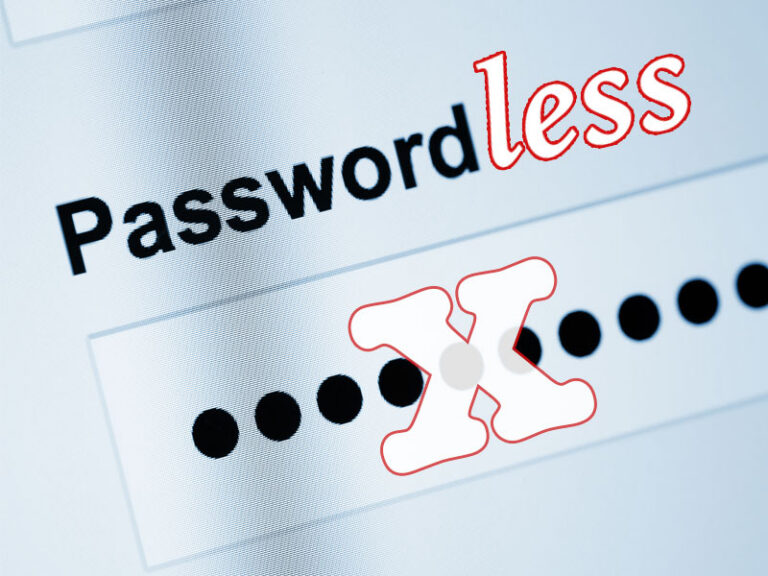
You’ve probably encountered a message asking whether you’d like to create a passkey when signing in to a website or app. Perhaps you’ve accepted. Perhaps you’ve clicked “Not now” and carried on using your password.
But what does this increasingly familiar technology mean for your business?
Passwordless authentication offers a more secure way to control access to your business systems and data. For Charleston businesses facing growing cybersecurity threats, it’s worth understanding how it works, what protection it offers, and how to introduce it without disrupting operations.
What Is Passwordless Authentication?
Passwordless authentication lets you verify your identity and access an account without entering a traditional password. Instead, you use a trusted device, passkey, or another secure method to prove you’re authorized to sign in.
There are several ways to achieve this, but one of the most important developments is the passkey.
A passkey uses two mathematically linked digital keys. One stays private, while the other belongs to the website or application you’re accessing. They work together to verify your identity without transmitting a reusable password.
You usually unlock your passkey with your fingerprint, facial recognition, or a device PIN.
This makes signing in straightforward for employees while giving attackers fewer opportunities to steal credentials.
How Does Passwordless Authentication Improve Cybersecurity?
Passwordless security reduces your reliance on passwords that attackers can steal, guess, reuse, or obtain through phishing. Stronger authentication methods can help prevent unauthorized access to business accounts, even when your employees encounter convincing scams.
Consider an employee who receives an email directing them to a fake Microsoft 365 login page.
With a conventional password, they might enter their credentials and unknowingly hand them to a criminal.
A passkey works differently. It’s linked to the legitimate website, so it won’t authenticate the employee on the attacker’s imitation.
For your business, the benefits include:
- Stronger phishing protection: Attackers can’t trick employees into entering passkeys on fraudulent websites.
- Reduced credential theft: There are no reusable passwords for criminals to capture during a passkey sign-in.
- Simpler access: Employees can sign in without remembering complicated passwords or repeatedly requesting resets.
- Better identity protection: You can apply stronger controls to sensitive systems and privileged accounts.
Passwordless authentication doesn’t eliminate every cybersecurity risk. Attackers may still exploit stolen devices, compromised sessions, or weaknesses in account recovery procedures. But it can close off some of their most common routes into your business. (And all “closing off” strategies can contribute to meeting the requirements for cyber insurance.)
What’s the Difference Between Passwordless Authentication and MFA?
Multi-factor authentication (MFA) requires more than one form of identity verification. Passwordless authentication removes the need to enter a password. The two approaches can work together, and some passwordless methods provide MFA themselves.
Traditional MFA might require a password followed by a code sent to your phone.
That’s safer than relying on a password alone, but criminals can sometimes intercept codes or persuade employees to disclose them.
A passkey unlocked with a fingerprint or PIN can provide MFA without those extra steps. It combines possession of a trusted device with another form of verification.
The important distinction for business leaders is that not all MFA methods provide equal protection against phishing.
Passkeys vs. Hardware Security Keys: Which Is More Secure?
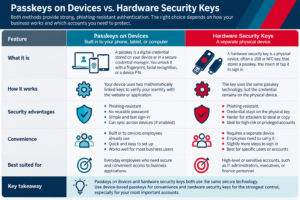
Passkeys and hardware security keys aren’t competing technologies. A hardware security key can store a passkey. The main difference concerns where the credential lives, how employees use it, and how your business controls access.
Passkeys stored on phones or computers offer convenient access. Some remain tied to one device, while others can synchronize securely across devices through a credential manager.
Hardware security keys are separate physical devices, often resembling USB drives. Employees insert or tap them to authenticate. Compatible keys can store passkeys that remain on the physical device.
Both approaches can provide strong phishing-resistant protection.
However, dedicated hardware security keys offer particular advantages for employees with high-level access, such as IT administrators or finance personnel. Keeping credentials on a separate device can give your business tighter control over how they’re stored and used.
For everyday employees, passkeys on managed devices may provide an effective balance of security and convenience.
How Can Your Business Implement Passwordless Authentication?
Moving toward passwordless authentication requires planning. Start by reviewing your existing systems, identifying your highest-risk accounts, and deciding which authentication methods suit your employees and working practices.
Your IT team or managed services provider should help you:
- Assess compatibility. Identify which applications and devices support passwordless sign-ins and which still require passwords.
- Prioritize sensitive accounts. Protect administrators, executives, and employees handling financial or confidential information first.
- Choose suitable methods. Consider device-based passkeys, hardware security keys, and how employees access systems remotely.
- Plan secure recovery. Establish how employees regain access if they lose a phone or security key, without creating an easier route for attackers.
- Introduce changes gradually. Test the approach, train employees, and monitor the results before extending it across your business.
If you use Microsoft 365, Microsoft Entra ID provides options for managing passwordless authentication and controlling access to business resources.
However, your choice of technology should follow your business requirements, not dictate them.
Will Your Business Still Need Passwords?
Yes, in many cases. Older applications, specialist systems, and some third-party services may not support passwordless authentication. Your business may need to maintain passwords for certain accounts while moving others to stronger methods.
In our experience working with businesses in Charleston and throughout the Carolinas, moving away from passwords isn’t always straightforward. Existing systems, employee working practices, and security requirements all need consideration.
As Steve Rattacasa, our chief technology officer, says:
“Businesses often overlook that while moving to passwordless is a great step, if the fallback mechanisms for recovering an account are weak, the weakness still exists. If a user can simply call the Helpdesk and have a credential reset without secure verification or just has to answer security questions, it undermines the effectiveness of a move to passwordless.”
The goal is a practical transition that strengthens identity and access management without interrupting your operations.
You don’t have to eliminate every password immediately to improve your cybersecurity. You can begin by protecting the accounts that matter most.
Is Your Business Ready to Move Beyond Passwords?
Passwordless authentication can strengthen your defenses against credential theft and phishing, but choosing the right approach requires an understanding of your systems, employees, and business risks.
Katalyst helps businesses across Charleston evaluate their IT security and plan improvements that support their operations.
We always track real incident and threat data across the organizations we protect.
If you’d like to discuss with one of our experts how stronger identity protection could help secure your business, schedule a conversation today and let’s talk security.
Throughout October, Steve Rattacasa is hosting live sessions with industry expert guest speakers to discuss threats and cyber-trends shaping how our clients protect themselves. You can save your seat here.